Building a Personal Cybersecurity RAG: From a Skills Repository to a Searchable Red-Team Knowledge Base
Building a Personal Cybersecurity RAG: From a Skills Repository to a Searchable Red-Team Knowledge Base
A technical build log covering the architecture, infrastructure, corpus preparation, ingestion, retrieval, CVE knowledge, MCP integration, operational lessons, and the first evaluation run.
Note: This is a personal cybersecurity research and assessment assistant, and part of my learning - I am still a beginner. HTB challenges were used only as a lab benchmark with DeepSeek Flash; they are not real-world testing, and other models may be much faster. The design will keep evolving as I test and learn more. It will also be tested in real-world pentests, and I will update this post with those results. The skills and notes I indexed come from my own work-related material and my notes from real work and engagements.
1. Why build it?
Security knowledge tends to end up scattered across Markdown notes, assessment write-ups, methodology documents, tool references, vulnerability-class guides, CVE records, and agent skills. Keeping all of that in one place is useful, but finding the right detail during an assessment is a different problem.
The goal of this project was to build a private, searchable knowledge layer that can:
- Retrieve relevant procedures, techniques, and supporting references from a large local corpus.
- Search by meaning as well as by exact technical terms, flags, protocol names, and product identifiers.
- Keep source attribution attached to retrieved material so an answer can be checked.
- Distinguish between what the indexed material supports and what it does not cover.
- Expose the knowledge base to an AI assistant through the Model Context Protocol (MCP).
- Keep the vector database and embedding service on the VPS rather than exposing them publicly.
- Grow over time as new research, notes, skills, and vulnerability references are added.
This is a retrieval-augmented generation (RAG) system, not an autonomous exploitation engine. The model can help formulate and explain a test, but the retrieved material is not proof that a vulnerability exists. Testing still needs to be authorized, scoped, and independently validated.
2. High-level architecture
The implementation uses a small VPS for storage, indexing, retrieval, and the MCP endpoint. The embedding model runs locally through Ollama. DeepSeek is used for answer generation. A local SQLite FTS5 database provides lexical retrieval alongside Qdrant’s vector search.
1 | |
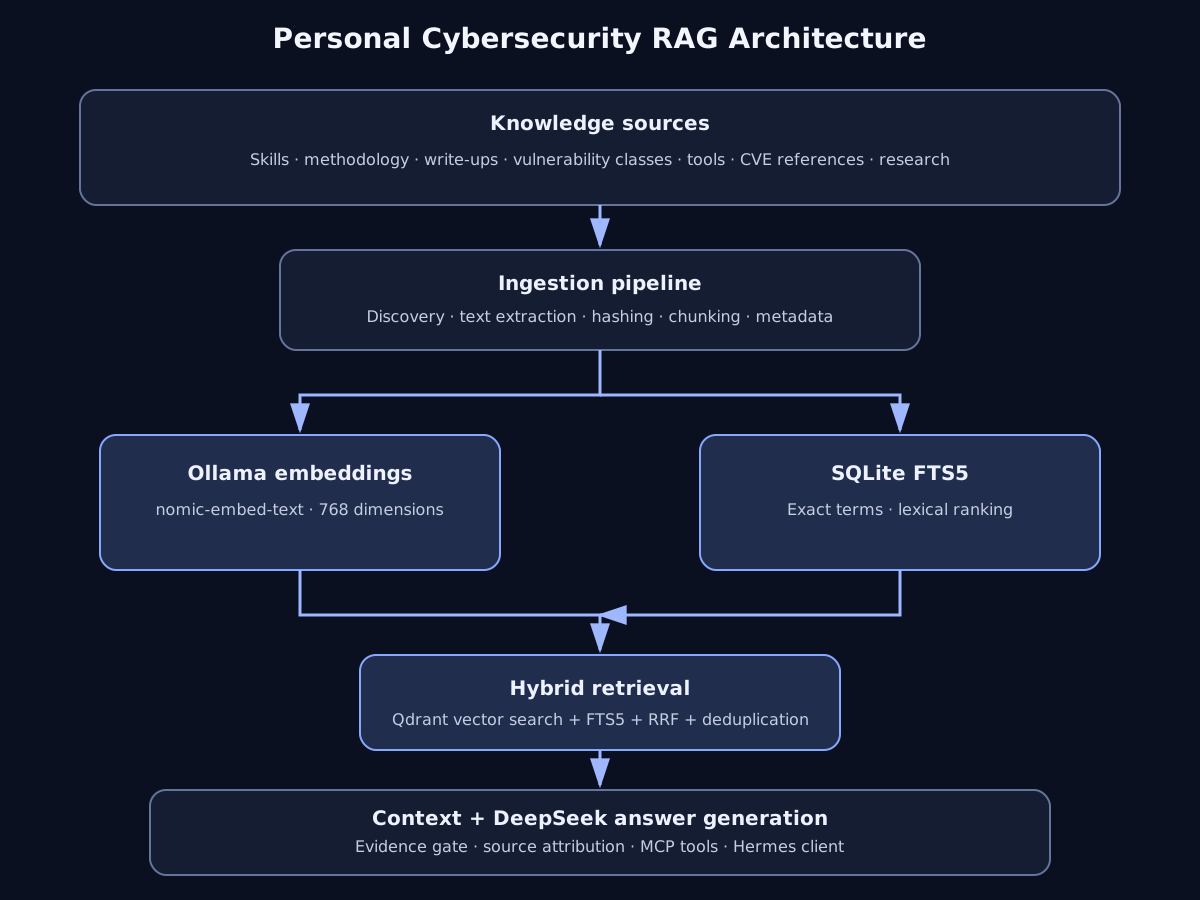
Main components
| Component | Role |
|---|---|
| Python | Ingestion, retrieval, orchestration, and MCP server |
| Qdrant | Vector storage and similarity search |
| Ollama | Local embedding inference |
nomic-embed-text |
768-dimensional text embeddings |
| SQLite FTS5 | Keyword and lexical search |
| Reciprocal Rank Fusion (RRF) | Combines vector and lexical result rankings |
| DeepSeek API | Final answer generation from retrieved context |
| MCP | Makes the knowledge base available as tools to an assistant |
| Hermes | Client that discovers and invokes the MCP tools |
| Cloudflare R2 | Considered/created for object storage and backup; not part of the live retrieval path described here |
3. VPS and environment setup
The system was deployed on a Debian VPS without a GPU. The intent was to keep the infrastructure modest and use CPU inference for embeddings, while delegating answer generation to an API.
VPS specifications
| Item | Configuration |
|---|---|
| OS | Debian 13.7 |
| CPU | 4 vCPU, AMD EPYC-Rome |
| RAM | Approximately 7.8 GiB |
| Storage | 128 GB SSD |
| GPU | None |
| Python | 3.13.5 |
| Docker | 29.9.3 |
| Docker Compose | v5.7.0 |
| Qdrant | v1.15.4 |
| Ollama | 0.40.14 |
The project root was /root/redteam-ai. Secrets, the private source repository name, and the VPS address are intentionally not included in this public build log.
Create the project and virtual environment
1 | |
A virtual environment was necessary because Debian’s system Python uses the externally managed environment model. Installing packages globally with pip produced the expected externally-managed-environment error, so the project dependencies were installed inside .venv.
Project layout
The working layout evolved as ingestion, retrieval, and MCP functionality were added:
1 | |
The tree is a logical project layout. Some directories were scaffolded for future expansion; it should not be read as a claim that every folder contains a completed module or production-ready implementation.
Environment variables and secrets
The .env file stores configuration such as the Qdrant API key, Qdrant URL, DeepSeek API key, generation model, Ollama URL, embedding model, and collection names. The actual values are not published.
Example shape:
1 | |
Secure the file and keep it out of Git:
1 | |
The .gitignore excludes .env, virtual environments, Python cache files, generated storage, logs, Qdrant data, and other local runtime artefacts. API keys and customer data should never be committed to the repository.
4. Deploying Qdrant
Qdrant was deployed as a Docker container and bound to loopback. The database is not exposed directly to the public internet.
Docker Compose
1 | |
Generate a key and start the service:
1 | |
The collection used for general security knowledge is redteam_knowledge. It uses 768-dimensional vectors and cosine similarity. A separate collection, redteam_cves, was also created for CVE-oriented records.
Useful checks:
1 | |
The Qdrant client initially produced a compatibility warning when a newer client version was used against the server. The client was pinned to qdrant-client==1.15.1 to align with the deployed Qdrant 1.15.x server.
5. Local embedding service with Ollama
Ollama was installed on the VPS and configured for local access. The selected model was nomic-embed-text.
1 | |
The model reports 768-dimensional embeddings. That dimension must match the vector size configured in Qdrant. If the embedding model is changed later, the collection dimensions and the existing vectors need to be considered; vectors from different embedding models should not be mixed casually.
The embedding call used by the early retrieval implementation was:
1 | |
The embedding service was intended to remain bound to localhost (127.0.0.1:11434).
6. Building the knowledge corpus
The knowledge source is broader than a collection of HTB write-ups. It is intended to cover day-to-day pentesting and security research, including methodology, vulnerability classes, tools, operational guidance, Active Directory, cloud, mobile, APIs, and AI security.
Source repository and content categories
A private skills and reference repository was imported into the project. Its identity is omitted here. The repository contained a large collection of Markdown material, skills, libraries, and helper utilities.
The inspected source tree included categories such as:
1 | |
The source inventory changed as collections were inspected and filtered. One inventory reported approximately 9,800 Markdown files in the wider source repository. Another scan counted 3,156 SKILL.md files across the inspected skills and libraries trees. A separate offensive/cybersecurity skill collection contained 836 SKILL.md files at the time it was counted. These figures describe different scopes and scans, not one mutually exclusive file total.
A later ingestion discovery pass selected 6,236 Markdown files for indexing. The difference is expected because the source repository included files outside the final selected corpus and because inventory commands used different roots and filters.
What a skill contains
A typical SKILL.md is more than a short note. It commonly contains:
- YAML front matter, including a skill name and description.
- A summary of the task or security domain.
- Trigger conditions and when the skill should or should not be used.
- Prerequisites, assumptions, and scope requirements.
- A methodology or ordered procedure.
- Commands, tools, references, and supporting documents.
- Evidence requirements and validation steps.
- Expected output or reporting structure.
For example, the inspected thinking-red-team material described threat modelling, attack-surface mapping, exploit validation, an anti-fabrication gate, severity, mitigations, and output requirements. Other examples included cache-poisoning hunting guidance and Active Directory references covering ACL abuse, environment constraints, methodology, OPSEC and telemetry, AD CS, NTLM relay, and Kerberos attacks.
The RAG indexes these skills as knowledge. It does not execute the skill files. A separate agent may use a retrieved skill as procedural guidance, but commands still need to be reviewed and run within the authorized engagement environment.
How skills become searchable text
The core conversion path is deliberately simple:
- Discover eligible source files.
- Read the file contents as text.
- Normalize and split the text into overlapping chunks.
- Attach source and chunk metadata.
- Generate an embedding for each chunk.
- Store the embedding and text payload in Qdrant.
- Add the text to SQLite FTS5 for lexical search.
Most of the selected skills and references were already Markdown, so the main bulk ingestion path indexed Markdown directly. Libraries for PDF, HTML, and DOCX extraction were installed or considered (pypdf, beautifulsoup4, python-docx, and lxml), but the recorded bulk run selected .md files. This build log therefore does not claim that a universal, fully verified converter for every PDF, DOCX, HTML, source-code, or binary format was completed. Those formats require explicit extraction adapters and testing before they should be treated as indexed.
The project also included local knowledge/ folders for original write-ups, methodology notes, research, and CVE-related material. This keeps curated notes separate from imported third-party references.
7. Ingestion pipeline
The first proof of concept was intentionally small. A single file, knowledge/writeups/adcs-esc1.md, was indexed to verify the end-to-end path before ingesting the larger corpus.
The first pass created one vector point. An ESC1-related query returned a similarity score of approximately 0.8464, which confirmed that the embedding and retrieval path was working at a basic level. This was a smoke test, not a measure of retrieval quality across the entire corpus.
Chunking strategy
The recorded chunking configuration was:
| Setting | Value |
|---|---|
| Chunk size | 1,200 characters |
| Overlap | 200 characters |
| Embedding dimensions | 768 |
| Similarity | Cosine |
Overlap helps preserve context when a procedure or explanation crosses a chunk boundary. Character-based chunking is easy to implement, but it can split code blocks, tables, or semantic sections. A future improvement would be structure-aware chunking that respects Markdown headings, code fences, lists, and document boundaries.
Payload and identity
Each indexed chunk stores fields similar to:
1 | |
Deterministic point IDs and content hashes make it possible to identify chunks consistently and avoid needless re-indexing. The source path remains attached to the result so that a retrieved passage can be traced back to its file.
Early semantic retrieval
The first rag/retrieval/search.py implementation performed vector-only retrieval. Its central operation was:
1 | |
The early search(query, limit=5) function printed the source, score, chunk index, and text. This was enough to validate the basic pipeline, but semantic search alone is not ideal for security work. Exact identifiers such as msDS-AllowedToDelegateTo, CVE IDs, HTTP headers, command-line switches, registry paths, and product names may be more reliably found through lexical matching.
Incremental ingestion and manifest
The ingestion script was later expanded to support a repeatable corpus update rather than re-embedding everything on every run. The recorded design included:
discover_files()to locate eligible files.index_file()to process and index an individual file.main()to coordinate the run.- SHA-256 hashes to detect changed files.
- Stable source identifiers and chunk metadata.
- A JSON manifest at
storage/ingestion_manifest.json. - Skipping files whose content hash had not changed.
- Re-indexing changed files.
- Detecting deleted source files.
- A
--dry-runmode. - Per-run counters for discovered, updated, skipped, deleted, and failed files.
- Preserving previous manifest entries when an individual file fails.
- Disabling deletion/pruning when failures occur, to avoid deleting valid indexed content because of an incomplete run.
Example manifest shape:
1 | |
The timestamp is an example from the recorded manifest. A production implementation should also record the embedding model, chunking configuration, parser version, and source revision so that a model or pipeline change can trigger a controlled re-index.
Bulk ingestion
The larger corpus was first inspected with a dry run. The recorded discovery output was:
1 | |
The ingestion was run in a tmux session so that it could continue after disconnecting from SSH:
1 | |
The final recorded summary was:
1 | |
The two failures were empty or unsearchable feature.md files in scan-related directories. Because files failed, the script disabled pruning. The manifest recorded 6,234 successfully indexed files and 60,194 chunks. Qdrant reported a green collection with 60,194 points; at the time of inspection, 60,144 vectors were reported as indexed, meaning background indexing was still catching up.
The resulting corpus is approximately 60K searchable chunks. It is a snapshot of the selected Markdown sources at the time of ingestion, not a claim that every file in the upstream repository was ingested.
8. Adding lexical search with SQLite FTS5
Vector search is useful for conceptual questions, but a pentester often needs exact matching. For example:
msDS-AllowedToDelegateToSeImpersonatePrivilegeX-Forwarded-HostCVE-2025-9238- An exact endpoint, function name, or error string
SQLite FTS5 was added as a lightweight full-text search layer. The database is stored at storage/knowledge_fts.db. The recorded index contained approximately 60,194 rows and occupied roughly 109 MB. A backup copy of the FTS search module was also created during development.
The lexical layer allows exact terms and token matches to contribute to retrieval even when the embedding similarity is not high. It also avoids relying on a full Qdrant collection scroll for every keyword query.
9. Hybrid retrieval with Reciprocal Rank Fusion
The retrieval path evolved from vector-only search to hybrid retrieval:
- Embed the query and search Qdrant.
- Search the SQLite FTS5 index using the same query.
- Merge the two ranked result lists using Reciprocal Rank Fusion (RRF).
- Deduplicate overlapping chunks.
- Build a context set for the answer-generation layer.
RRF is useful because vector and lexical search produce different ranking signals. Rather than comparing their raw scores directly, RRF combines the rank positions of documents across result lists.
The general scoring form is:
$$\operatorname{RRF}(d) = \sum_{r \in R} \frac{1}{k + \operatorname{rank}_r(d)}$$
Here, d is a chunk, R is the set of ranked retrieval lists, and k is a smoothing constant. The exact implementation should use one consistent value of k and preserve source metadata when merging results.
Recorded hybrid retrieval latency was approximately 0.22-0.33 seconds for the tested queries. This is an observed development measurement, not a guaranteed latency under concurrent load or for every query size.
10. Answer generation and grounding
rag/ask.py connects retrieval to the DeepSeek API. The recorded functions were:
retrieve(question, limit=5)retrieve_cves(question, limit=3)format_cve_context(payload)ask(question)
The intended flow is:
1 | |
Why the relevance gate matters
One of the early test questions was:
What is
msDS-AllowedToDelegateTo?
At that point, the indexed proof-of-concept corpus contained only the AD CS ESC1 note. The correct behaviour was not to invent an explanation from unrelated context and pretend it came from the knowledge base. The answer path was refined to make the gap explicit. A later strict-gate test returned:
1 | |
This is an important RAG property: the system should be allowed to say that its indexed sources do not answer the question. A model may have general prior knowledge, but that should not be confused with evidence retrieved from this private corpus.
DeepSeek API compatibility issue
An SDK call initially failed with:
1 | |
The compatibility fix was to pass the option through extra_body:
1 | |
This is a version-specific integration detail. SDKs and provider request schemas can change, so the installed client version and the provider’s current API documentation should be checked when upgrading.
11. CVE knowledge subsystem
A separate Qdrant collection named redteam_cves was created for vulnerability records. The answer layer has a dedicated retrieval path and context formatter for CVE material.
The MCP-facing CVE functionality supports:
- Searching CVE records.
- Filtering by severity.
- Filtering to records marked as KEV (Known Exploited Vulnerabilities).
- Looking up a specific CVE ID.
The recorded functions include retrieve_cves() and format_cve_context() in the answer layer, plus the MCP tools described later.
NVD feed handling
The 2026 NVD feed metadata was retrieved from:
1 | |
An initial attempt to download the archive without the .json portion returned HTTP 404. The corrected archive was:
1 | |
The archive was approximately 43 MB, with an uncompressed JSON file of approximately 521 MB. unzip -t completed successfully, confirming archive integrity.
A Log4Shell record (CVE-2021-44228) was noted as imported and KEV-enriched during development. The recorded work confirms the collection and search/detail interface and the feed download/integrity check. It does not establish that the complete 2026 NVD feed was fully imported, nor does it preserve a verified final import script. The feed download should therefore not be presented as proof of a complete, continuously updated CVE database.
A future CVE ingestion job should preserve the source feed timestamp, CVSS vector and version, CWE, affected configurations, references, KEV status and date, and the source record’s update time. It should also handle NVD API/feed changes and incremental updates.
12. MCP server
The next step was to make retrieval available to an AI assistant without requiring the assistant to know the internal Python modules or database structure. MCP provides a tool interface for this.
The MCP SDK was installed in the virtual environment (mcp>=1.28,<2; the recorded version was 1.30.0). The server uses Streamable HTTP and listens on 127.0.0.1:8765.
Exposed tools
The recorded tools were:
| MCP tool | Purpose |
|---|---|
search_security_knowledge(query, limit=5) |
Search the general security corpus |
search_cves(query, limit=5, severity="", kev_only=False) |
Search CVE records with optional filters |
get_cve_details(cve_id) |
Retrieve a specific CVE record |
ask_security_rag(question) |
Run the complete retrieval and answer workflow |
The server also included an expand_context(results, radius=1) helper to include neighbouring chunks around a retrieved passage. This is useful when a relevant result is only one part of a longer procedure or explanation.
Start the MCP server
1 | |
Access it through an SSH tunnel
Because the MCP server is bound to loopback on the VPS, a local machine can reach it through an SSH tunnel:
1 | |
The endpoint path used by the client was /mcp.
13. Connecting Hermes
Hermes was used as the MCP client. After the SSH tunnel was active, the server was registered locally:
1 | |
The test discovered the four tools exposed by the server. An already-running Hermes session did not automatically pick up the new server configuration; reloading MCP configuration or starting a new session was required.
The resulting interaction is:
1 | |
This makes the knowledge base reusable from an assistant workflow. The assistant can retrieve a methodology, search a CVE, or ask a grounded question without directly accessing Qdrant or the SQLite database.
14. Python modules and scripts
The following is the confirmed project-level Python module inventory from the development work. It describes the recorded responsibilities and function names. It is not a claim that the complete final source text of every file is reproduced in this post.
| File | Recorded responsibility |
|---|---|
rag/config/settings.py |
Central configuration for URLs, model names, collection names, and environment-backed settings. The final file contents were not retained in the build notes. |
rag/ingestion/ingest.py |
File discovery, filtering, hashing, chunking, embedding, Qdrant upsert, manifest management, dry-run, and ingestion summary. Recorded functions: discover_files(), index_file(), main(). |
rag/retrieval/search.py |
Early semantic vector search using Ollama embeddings and Qdrant. Recorded function: search(query, limit=5). |
rag/retrieval/fts_search.py |
SQLite FTS5 lexical search over indexed chunk text. |
rag/ask.py |
Retrieval orchestration, CVE retrieval/context formatting, DeepSeek generation, relevance gate, and final answer. Recorded functions: retrieve(), retrieve_cves(), format_cve_context(), ask(). |
rag/mcp_server.py |
MCP server and tool registration, including context expansion. Recorded helper: expand_context(results, radius=1). |
Representative early semantic-search implementation
This is the recorded core of the initial vector-search implementation, not a substitute for the later hybrid search module:
1 | |
Project utilities versus imported repository utilities
The source repository also contained helper scripts, including:
1 | |
These are utilities from the imported source repository. They should not be described as custom RAG pipeline scripts. The RAG-specific modules are listed in the preceding table.
The exact final contents of every Python module were not preserved in the conversational build record. For that reason, this post documents the confirmed modules, functions, behaviours, and representative code rather than fabricating complete source listings. The actual project repository remains the authoritative source for the complete implementation.
15. Running and maintaining the system
Check tmux sessions
Long-running ingestion and MCP processes were managed with tmux:
1 | |
Detach without stopping the process using Ctrl-b, then d.
Check services
1 | |
Review ingestion output
1 | |
Inspect the Qdrant collection
1 | |
Inspect the FTS database
1 | |
The table name above represents the FTS table used by the local implementation; check the actual schema before adapting the command to another checkout.
Re-run ingestion
The ingestion script supports a dry-run mode in the recorded implementation. Use the exact flag supported by the current checkout and inspect the proposed changes before a production run:
1 | |
For a large corpus, run it inside tmux and retain the log. Do not prune deleted sources when the run is incomplete or has file failures. The implementation’s failure-aware pruning behaviour was added specifically to avoid data loss during partial ingestion.
16. Initial evaluation: HTB as a benchmark
HTB was used as an initial test set to observe how the assistant handled different challenge styles and difficulty levels. It was not the intended domain boundary for the knowledge base. The broader target remains real-world security assessment preparation and research.
The recorded timing table was:
| Challenge | Difficulty | Download (s) | Review (s) | Analysis (s) | Exploit (s) | Reported total (s) |
|---|---|---|---|---|---|---|
| Flag Command | Very Easy | - | 8.6 | 10.4 | 2.6 | 22 |
| TreaPortal | Easy | 2.7 | 4.3 | 35.3 | 4.1 | 51 |
| Nomad Notes | Medium | 10.2 | 110.9 | 103.1 | 224.1 | 448 |
| Resizer | Hard | 4.0 | 95.0 | 157.0 | 53.0 | 309 |
| ArtificialUniversity | Insane | 6.1 | 155.2 | 287.9 | 1172.0 | 1621 |
| Total | 2451 |
The reported aggregate is 2,451 seconds, or 40 minutes and 51 seconds. The TreaPortal phase values sum to 46.4 seconds while the reported total is 51 seconds. The original reported values are preserved here rather than silently changing the total.
What was tested
Flag Command - Very Easy
A secret command was identified in /api/options. A POST request to /api/monitor returned the flag. A separate fast run reached the flag 16 seconds after the initial GET, using six HTTP requests. The timing table records 22 seconds for the run shown above.
TreaPortal - Easy
The test focused on an array-typed query parameter bypassing a check that expected typeof username === 'string'. The case was useful for testing how the assistant reasoned about type confusion and input validation.
Nomad Notes - Medium
The investigation examined a Content Security Policy nonce bypass involving a $ backreference. The flag survived only across a same-origin hop, making origin behaviour part of the validation.
Resizer - Hard
The exploit involved a cross-compiled helpers.so, a single write, and a forced worker recycle. This tested whether the assistant could reason about a more involved exploitation path and supporting build details.
ArtificialUniversity - Insane
The challenge involved price-trust behaviour in checkout, a gRPC UpdateService path, and eval(price_formula). The work reached the gRPC layer and included local validation of a raw HTTP/2 gRPC frame and a PDF.js payload. Approximately 30 admin-browser bot round trips took between 23 and 84 seconds each. The recorded 1,172-second live phase was inflated by blind bot testing and a container restart after a recursive-bot mistake. A clean estimate of four to five minutes for understanding plus bot execution was an estimate, not a separately measured result.
What the benchmark does and does not show
The benchmark demonstrates that the workflow was exercised against several lab scenarios with different technical demands. It also exposed where time was spent, especially when external browser automation or repeated bot interactions were involved.
It does not establish a general success rate, prove that the system can autonomously complete arbitrary pentests, or measure performance on client environments. Only the configured DeepSeek Flash model was used in the recorded benchmark. No comparative speed or quality claim is made about other models.
I used DeepSeek Flash for all of these runs, and I have not tried other models yet. Other models might solve the same challenges much faster, so these timings are specific to this one model and should not be read as a general speed result for the system.
17. Security and operational considerations
A security knowledge base can itself become a sensitive asset. It may contain exploit procedures, internal notes, assessment artefacts, credentials accidentally copied into notes, or client-specific details. The following controls are important:
- Keep Qdrant and Ollama bound to localhost unless a separately secured access design is implemented.
- Use strong API keys for services that support them.
- Keep
.envout of Git and restrict its file permissions. - Do not put client evidence, credentials, tokens, or confidential reports into a third-party generation API unless the engagement terms and data-handling policy explicitly permit it.
- Separate public research from client-specific knowledge.
- Keep source paths and provenance with every retrieved chunk.
- Treat imported skills and retrieved documents as untrusted input. A document can be outdated, inaccurate, maliciously modified, or contain prompt-injection text.
- Do not let retrieved content override system or engagement instructions.
- Confirm authorization, target scope, rules of engagement, and testing windows before using a suggested procedure.
- Validate findings independently. A retrieved exploit path is a hypothesis, not evidence that a target is vulnerable.
- Keep backups of the source corpus, ingestion manifest, and databases. Test restoration rather than assuming that a copied directory is a valid backup.
The assistant should follow a disciplined workflow: establish scope, retrieve relevant methodology, formulate a testable hypothesis, perform one controlled test at a time, retain reproducible evidence, and report only validated findings. Unknowns should remain unknown rather than being filled with plausible-sounding output.
18. Current state and known limitations
At the point covered by this build log, the system had the following confirmed state:
- Debian VPS deployed with Docker, Qdrant, and Ollama.
nomic-embed-textconfigured for 768-dimensional embeddings.- General knowledge collection populated with 60,194 vector points from 6,234 successfully indexed Markdown files.
- Two files failed during bulk ingestion; pruning was disabled for safety.
- SQLite FTS5 contained approximately 60,194 searchable rows.
- Hybrid vector and lexical retrieval was implemented, with observed query latency around 0.22-0.33 seconds in the tested environment.
- DeepSeek generation was integrated with a relevance gate to avoid generating from unrelated or missing context.
- A separate CVE collection and MCP CVE search/detail tools were implemented; NVD feed download and archive integrity were verified, but a complete 2026 feed import is not established by the recorded evidence.
- MCP Streamable HTTP server exposed four tools on localhost port 8765.
- Hermes connected through an SSH tunnel and discovered the four tools.
- HTB was used as an initial benchmark across five challenges.
Limitations to address next
- Parser coverage: The completed bulk run indexed Markdown. Add and test explicit PDF, DOCX, HTML, source-code, and other format adapters before claiming broad file-format support.
- Structure-aware chunking: Improve chunk boundaries for Markdown headings, code blocks, tables, and long procedures.
- Retrieval evaluation: Build a labelled query set with expected source documents and measure recall@k, precision@k, MRR or nDCG, and citation correctness.
- CVE freshness: Finish and verify incremental NVD/KEV ingestion, preserve update timestamps, and define a scheduled refresh process.
- Re-index controls: Record embedding model and chunker versions in the manifest and support safe full re-indexing when they change.
- Access control: Add authentication and authorization at the MCP boundary if the service ever needs to be accessed beyond the local SSH tunnel.
- Observability: Record query latency, retrieval ranks, selected chunks, generation latency, token usage, and failure reasons without logging secrets or sensitive assessment data.
- Corpus quality: Detect duplicates, stale procedures, broken references, and conflicting guidance. Add source version and review dates where possible.
- Backups and restore: Formalize encrypted backups and test restoration of Qdrant, FTS5, manifests, and original source material.
- Evaluation beyond HTB: Test the system against representative web, API, AD, cloud, mobile, and LLM-security research questions using a curated expected-answer/source set. Do not use confidential client data without approval.
19. Closing notes
The most useful outcome so far is not simply that a model can answer questions about security. It is that a large body of technical material can be converted into a searchable corpus, retrieved through both semantic and exact-term search, exposed through a stable tool interface, and used with an explicit evidence boundary.
The architecture is intentionally modular. The corpus can grow independently of the model, the embedding layer can be replaced with a controlled re-index, and the assistant can use the same MCP tools from different clients. The next meaningful improvement is not just adding more documents. It is measuring retrieval quality, improving source structure and freshness, and making every answer easier to verify against the material that supports it.
Appendix A - Dependency notes
The dependency set evolved during development. The recorded packages included:
1 | |
The Qdrant client was pinned to 1.15.1 after a compatibility warning with the 1.15.4 server. SQLite FTS5 became the lexical search implementation; rank-bm25 was present in the earlier dependency set but should not be assumed to be the active lexical engine in the final hybrid path.
A representative installation sequence is:
1 | |
Pin and lock exact versions in the actual deployment before reproducing the environment. The list above is a development record, not a fully resolved lockfile.
Appendix B - Useful operational commands
1 | |
Appendix C - Reproduction caveats
This post records the implementation and measured outputs that were retained during the build. It intentionally does not publish credentials, private repository identifiers, server addresses, private skill paths, client data, or unverified source code. The complete source of each Python file should be taken from the project repository itself. Before reproducing, verify current package versions, provider API parameters, NVD feed URLs, and the exact CLI flags in the checkout being used.
Final note: The HTB runs in this post are a lab test only - doing HTB challenges is not the same as testing in the real world. I used them to measure this system, and I do not yet know how well it will perform on real engagements. The next step is to test it against real security work using my own skills.